
EasySocial Availability Management: Lead & Call Routing
Ensuring every lead and call reaches the right person at the right time
In any sales or support-driven organization, response time and availability directly impact outcomes. When leads are assigned to unavailable agents or calls go unanswered, it results in missed opportunities, poor customer experience, and inefficiencies across the team.
To address this, EasySocial introduces Availability Management—a structured system that ensures leads and calls are handled only by agents who are actively available. This feature brings clarity, automation, and accountability to how teams manage their working hours and responsiveness.
Understanding Availability in EasySocial
Availability in EasySocial allows each team member to define when they are open to handling leads and calls. It combines two key controls: a real-time Online/Offline status and a predefined availability schedule.
The Online/Offline toggle acts as an immediate control. An agent can mark themselves offline during breaks, meetings, or any period when they are temporarily unavailable. When marked offline, the system automatically excludes them from new lead assignments and call routing.
The availability schedule, on the other hand, defines structured working hours. Agents can configure their working time for each day of the week. Outside these defined hours, the system automatically treats the agent as unavailable, even if they forget to manually toggle their status.
How the System Works
The availability system operates in the background to optimize both lead distribution and call handling.
When a new lead enters the system, EasySocial evaluates which agents are eligible based on two conditions: whether they are currently marked online and whether the current time falls within their configured working hours. Only agents who meet both criteria are considered for assignment. This ensures that leads are never routed to someone who cannot respond promptly.
Similarly, when a customer initiates a call, the system checks the availability of the assigned agent. If the agent is offline or outside their working hours, the call is automatically redirected to another available team member. This prevents missed calls and ensures continuity in communication.
Key Benefits
Availability Management introduces several operational advantages:
- It eliminates the risk of assigning leads to unavailable agents
- It ensures that incoming calls are always handled by active team members
- It improves response time and increases the likelihood of conversion
- It creates a more balanced and fair distribution of workload across the team
- It reduces dependency on manual coordination and supervision
Overall, it allows teams to function with greater discipline and efficiency, without adding complexity to daily workflows.
Setting Up Availability in EasySocial
Setting up availability is straightforward and can be configured in a few steps.
Begin by navigating to the Business Settings section within EasySocial. From there, open the Team Members panel where all users are listed.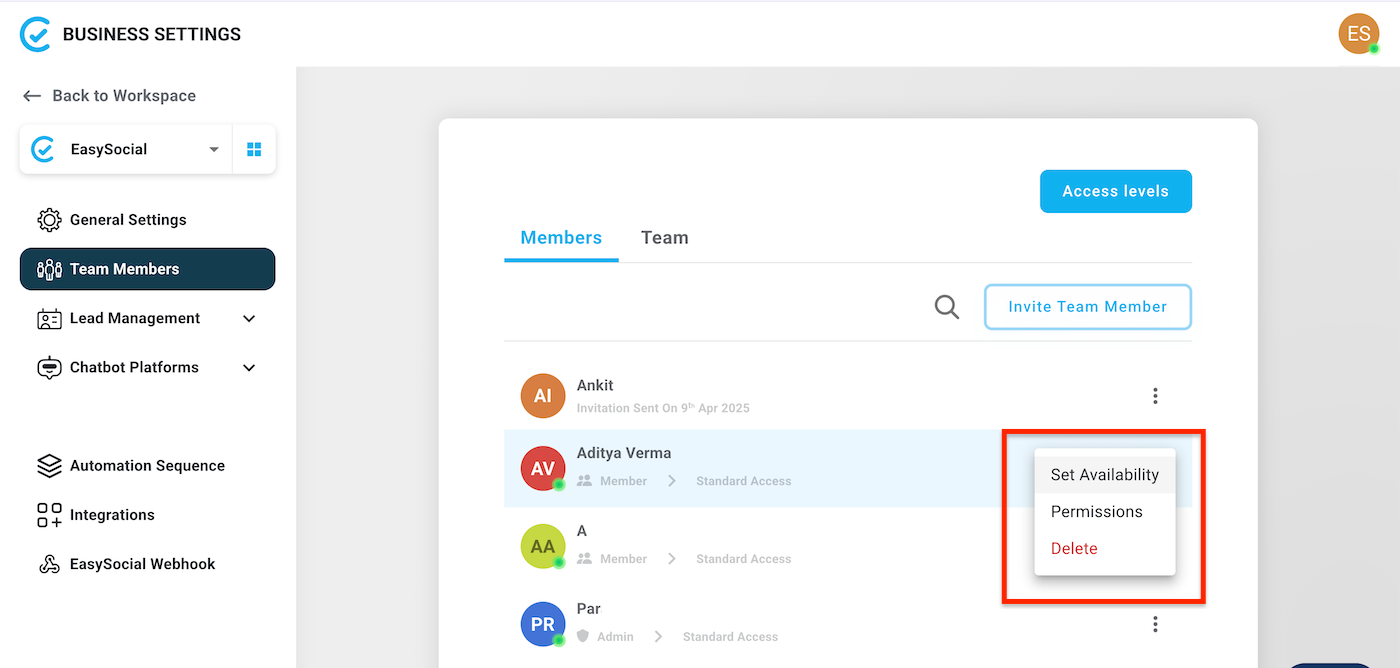
Select the team member whose availability you want to configure. Using the options menu associated with the user, choose “Set Availability.” This opens a configuration panel where you can define working hours for each day of the week. For each day, you can enable or disable availability and specify start and end times.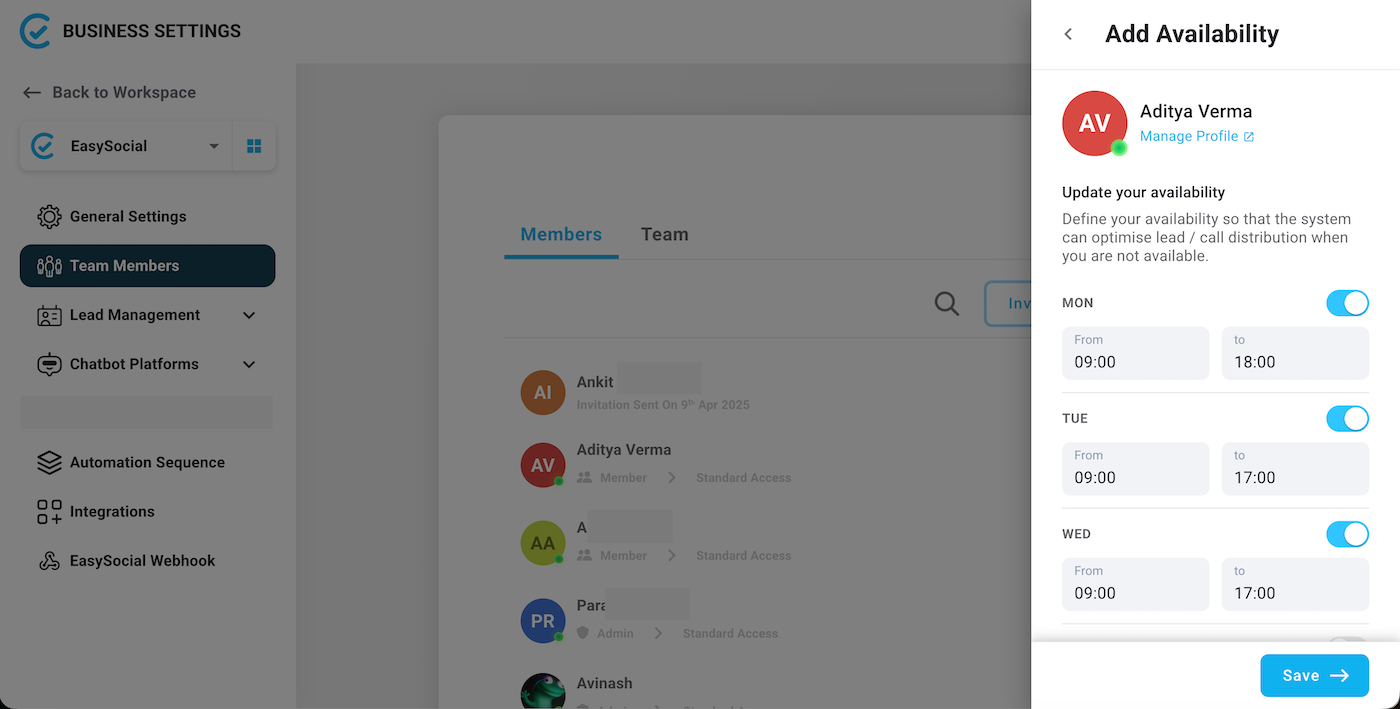
Once the schedule is defined, save the settings to activate it. The system will now automatically consider these timings when assigning leads or routing calls.
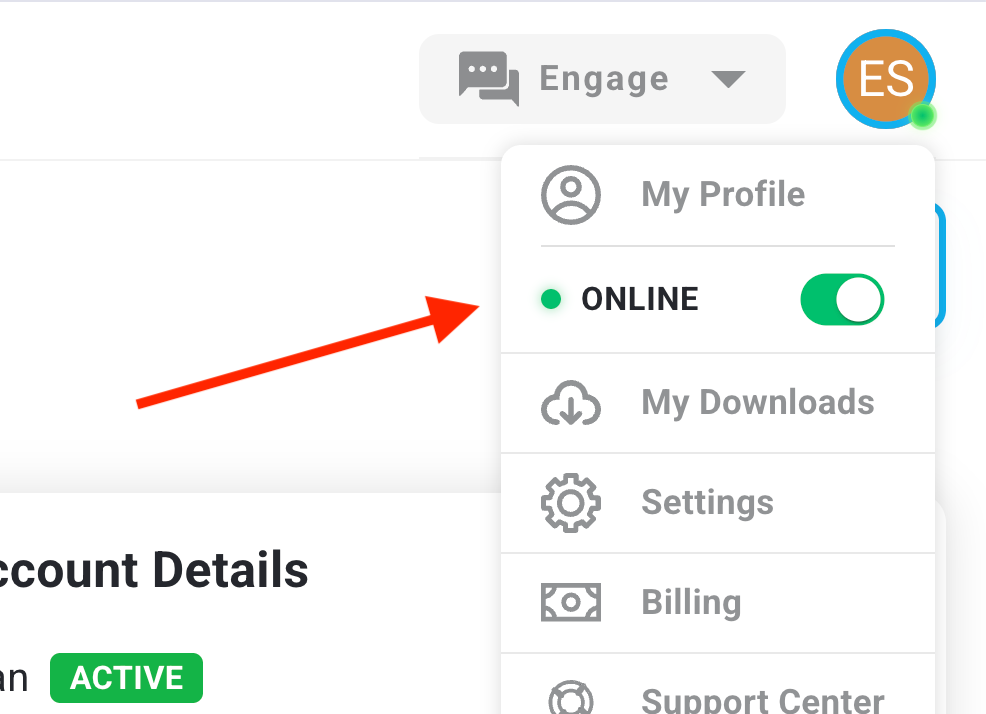
In addition to the schedule, each user can control their real-time availability using the Online/Offline toggle accessible from their profile menu. This allows flexibility for day-to-day interruptions without changing the overall schedule.
Practical Use Case
Consider a scenario where a lead is generated in the evening. One agent has working hours until 6 PM, while another is available until 10 PM. Instead of assigning the lead randomly or based on static rules, EasySocial evaluates availability in real time. The lead is assigned only to the agent who is still within working hours and marked online.
The same logic applies to calls. If a customer attempts to contact-easysocial-whatsapp-api-support an agent who is no longer available, the system ensures the call is redirected to someone who can respond immediately. This significantly reduces the chances of losing potential customers due to unavailability.
Conclusion
Availability Management in EasySocial is designed to bring structure and intelligence to team operations. By aligning lead assignment and call routing with real-time and scheduled availability, it ensures that every interaction is handled efficiently.
Rather than relying on manual coordination or assumptions about team presence, businesses can depend on a system that continuously optimizes who should handle incoming opportunities. This leads to faster responses, better customer experiences, and ultimately, improved business outcomes.