
Authentication
Use Authentication to generate and manage access tokens for secure connections between EasySocial and external platforms. Tokens can authenticate integrations that synchronize business data such as contacts, templates, campaigns, and other account resources.
Protect every token. An access token is a credential. Never publish it in documentation, source code, screenshots, chat messages, or client-side applications. Values shown in the interface should be treated as sensitive even when they are only examples.
Authentication page
The page provides a Generate Access Token action and a list of existing tokens. Each token entry shows the platform or token title, its validity, the token value, and a revoke control.
EasySocial allows up to five tokens. Use separate tokens for separate external platforms, environments, teams, or services so that one credential can be revoked without interrupting every connection.
Generate an access token
- Open Settings → General Settings → Authentication.
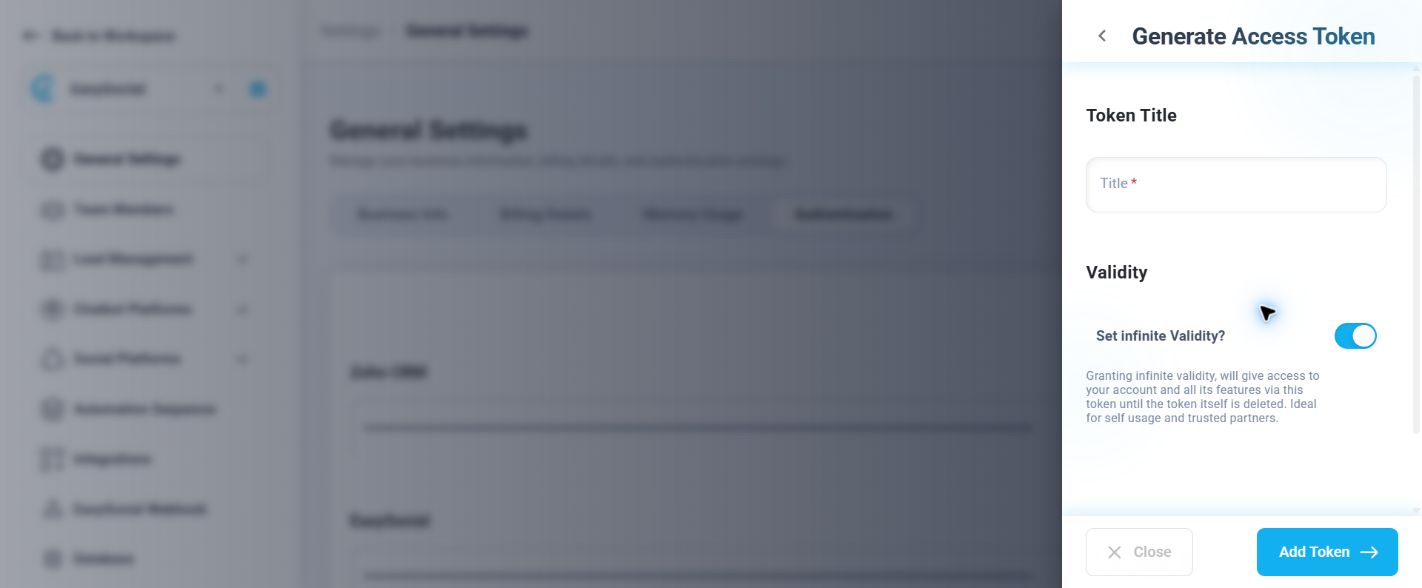
- Select Generate Access Token.
- Enter a descriptive Title.
- Choose whether the token should have infinite validity.
- Select Add Token to create the credential.
- Copy the token immediately and store it in the external platform’s secure credential field or secret manager.
Manage an existing token
| Control | Purpose | How to use it safely |
|---|---|---|
| Token title or platform label | Identifies which connection uses the credential. | Use a unique owner and destination naming convention. |
| Validity | Shows how long the credential remains usable; the page can show Permanent. | Review permanent tokens regularly and revoke those no longer needed. |
| Token field | Displays the credential used by the external connector. | Do not copy it into tickets, source control, or client-side code. |
| Revoke Token | Invalidates the selected credential so the connection can no longer authenticate with it. | Revoke immediately after suspected exposure, ownership change, or integration retirement. |
How external platforms use tokens
An external platform uses the token as proof that it is authorized to communicate with the EasySocial account. The exact setup depends on the connector, but the workflow is generally:
- Generate a token in EasySocial and give it a clear title.
- Copy the token into the external platform’s secure authentication setting, API credential field, or secret manager.
- Configure the connector’s data mapping and synchronization direction.
- Run a test connection or a limited synchronization.
- Confirm that only the intended EasySocial workspace and records are being accessed.
Depending on the external integration, the authenticated connection may synchronize contacts, templates, campaigns, media references, or other supported resources. Authentication proves identity; the connector’s own configuration determines which objects it reads, writes, or synchronizes.
Synchronization examples
- Contacts: A CRM connector may use the token to exchange contact records or updates with EasySocial.
- Templates: A content or messaging system may use the authenticated connection to read or publish supported templates.
- Campaigns: A campaign tool may use the credential to synchronize campaign definitions, statuses, or related data where the integration supports it.
- Other resources: Integrations may expose additional objects or media according to their supported API operations. Do not assume that every token has feature-level permissions unless the connector explicitly provides scopes.
Security best practices
- Use one token per integration: Do not share one credential across unrelated platforms or teams.
- Use clear ownership: Put the destination, environment, and responsible team in the title.
- Store it as a secret: Use a secrets manager, encrypted environment variable, or the external platform’s protected credential store.
- Keep it server-side: Never embed an EasySocial token in browser JavaScript, mobile apps, public repositories, or downloadable files.
- Limit exposure: Avoid screenshots and logs containing token values. Mask credentials in support tickets and monitoring output.
- Prefer expiry where practical: Infinite validity is convenient but increases the impact of a leak.
- Rotate on a schedule: Create a replacement token, update the integration, test synchronization, and revoke the old token.
- Revoke immediately after exposure: Treat a token posted to the wrong channel or committed to source control as compromised.
- Audit regularly: Review token titles, owners, destinations, and validity. Remove unused credentials before reaching the five-token limit.
- Test with minimal scope in the connector: Even when EasySocial provides broad account access, configure the external platform to synchronize only the records and objects it needs.
If a token is exposed
- Open Authentication and identify the exposed token by its title.
- Select its revoke control immediately.
- Remove the old credential from the external platform and any logs or configuration stores.
- Generate a replacement token with a new title.
- Update the external connector through its secure credential settings.
- Run a controlled synchronization and check for unexpected access or changes.
- Record the incident and update the team’s rotation procedure.
Troubleshooting
The external platform cannot authenticate: Confirm that the complete token was copied, that no whitespace or line break was added, and that the token has not been revoked. Check the connector’s expected authentication format.
Synchronization fails after a credential change: Verify that the external platform was updated with the replacement token and that the old token was not the only credential configured.
You cannot generate another token: EasySocial allows up to five tokens. Review existing credentials and revoke unused tokens before creating another one.
A former team member still has access: Identify tokens they owned, revoke those credentials, create replacements for active integrations, and update the external systems.