
Content Strategy
Use this page to tell EasySocial how you want your content to be planned and created. The guidance you enter here helps keep generated content aligned with your goals, rules, preferred length, and visual style.
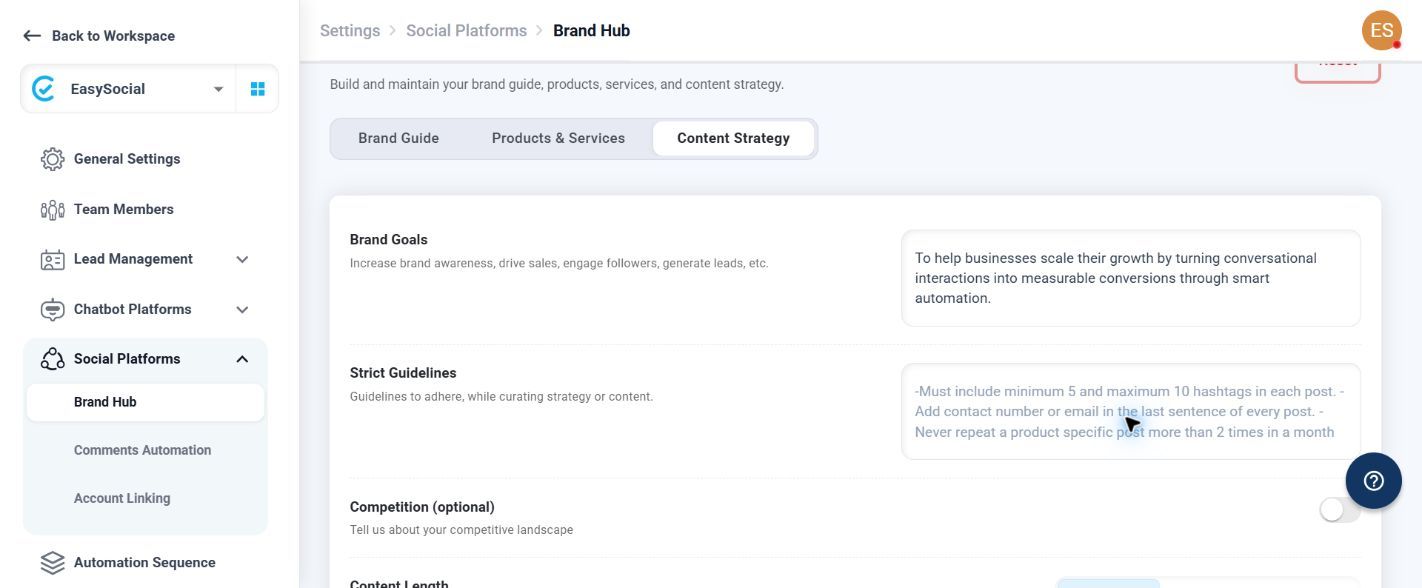
Strategy Settings
| Setting | What to enter or select |
|---|---|
| Brand Goals | Write the results you want your content to support. Use this field to explain the main direction EasySocial should follow when preparing content. |
| Strict Guidelines | Write the rules EasySocial should follow. Add any instructions that are important for keeping your content consistent with your requirements. |
| Competition (optional) | Enable this option when you want to provide information about the competitive landscape as part of your content strategy. |
| Content Length | Choose Minimum, Moderate, or Maximum to set your preferred level of detail for generated content. |
Brand Panels
Choose one or more image ratios—4:5, 1:1, 9:16, or 16:9—to create images in the formats you need. You can also edit the layout and apply your brand panel, such as your logo, to the design.
When Apply Brand Panel is enabled, the AI Assistant adds the configured brand logo when creating an image. When it is disabled, images are generated without the brand logo.
Creative References
Add social media posts or graphics that show the type of content you want to use as a reference. Upload PNG or JPEG images, then use the listed references when reviewing the material saved for your strategy. If you have not added any, the page shows No Creative References Added.
Keep the strategy guidance current so generated content follows the latest business goals and content rules