
Account Linking
Use Account Linking to check the social accounts connected to EasySocial and review the actions available for each one. Keeping the correct accounts connected lets you use them with the platform features that require a social connection.
Linked Accounts
Use the linked-account list to identify each connected profile. It shows the platform, profile name, connection status, and actions available for that account. This makes it easier to confirm that you are working with the intended social profile before reviewing its details or permissions.
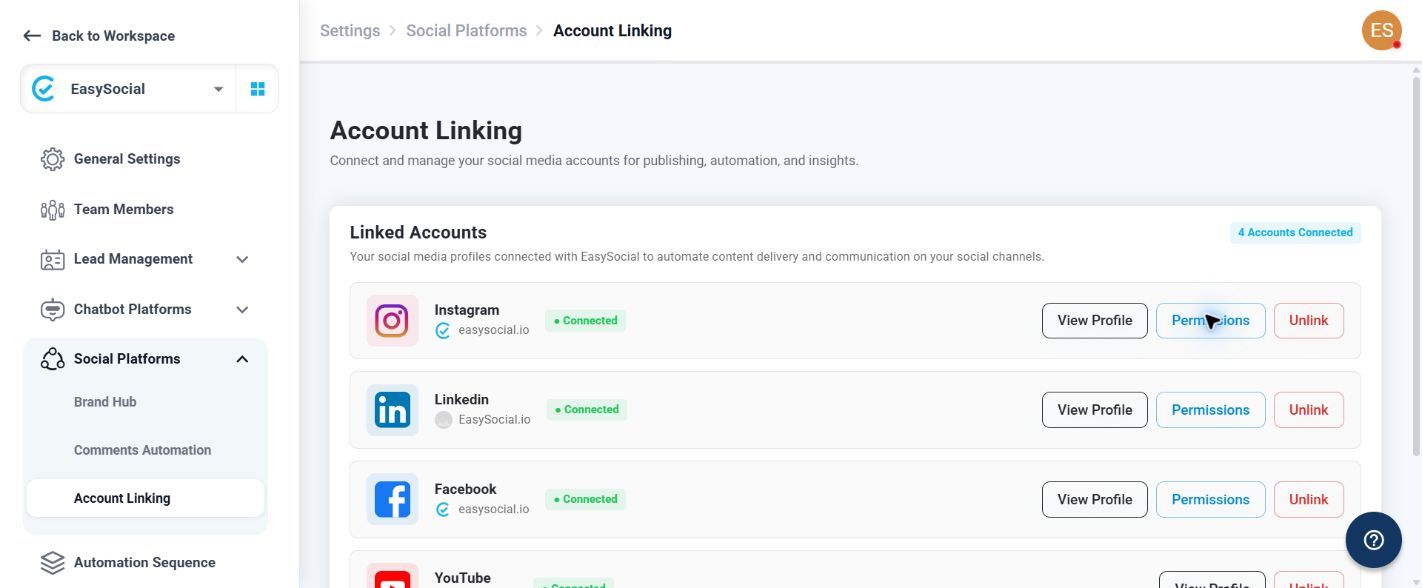
| Platform | Available actions | Purpose |
|---|---|---|
| View Profile, Permissions, Unlink | Use View Profile to check the account, Permissions to review access, or Unlink to remove the connection. | |
| View Profile, Permissions, Unlink | Use View Profile to check the account, Permissions to review access, or Unlink to remove the connection. | |
| View Profile, Permissions, Unlink | Use View Profile to check the account, Permissions to review access, or Unlink to remove the connection. | |
| YouTube | View Profile, Unlink | Use View Profile to check the account or Unlink to remove the connection. |
Connection Status
Each linked account displays a Connected status, and the page shows the total number of connected accounts. Before using an account, check that its displayed profile and status match the account you intend to use.
Review permissions before using a connected account for publishing or automation.