
Price Max / Bidding
Configure WhatsApp marketing message bidding, review delivery performance, and optimise your broadcast strategy.
About this guide
This guide explains how to activate Price Max, configure a country-specific multiplier, use Price Max in a broadcast campaign, and apply a bonus strategy to try to improve delivery to selected failed contacts.
Watch the tutorial: Price Max / Bidding video guide
What is Price Max?
Price Max is a bidding feature for WhatsApp marketing messages in EasySocial. It allows you to set a multiplier for a selected country as part of your message-delivery strategy.
A higher multiplier may improve the chance of delivery, while a lower multiplier may reduce it. The estimate shown in EasySocial is indicative only; it is not a promise of actual delivery.
Important: Price Max does not bypass Meta's delivery rules, and it cannot guarantee that a message will reach its recipient.
Activate Price Max
Before configuring Price Max, you must activate the feature by completing the required Meta agreement.
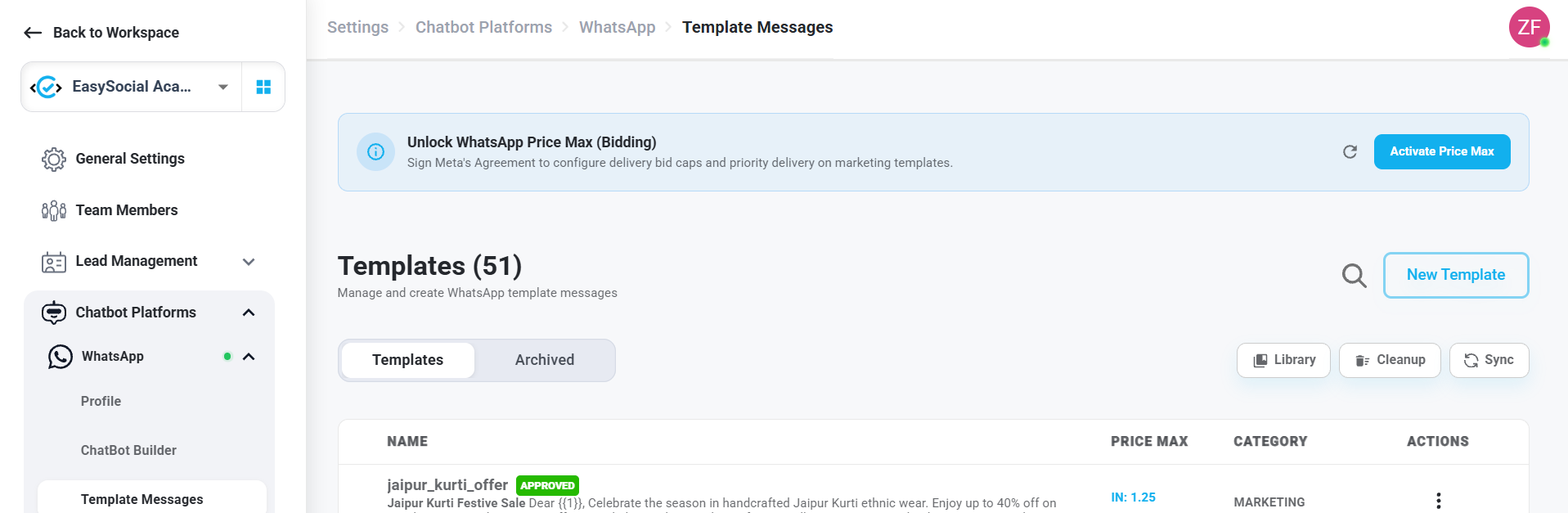
- Open the Templates page in EasySocial.
- Find the Unlock WhatsApp Price Max (Bidding) banner and select Activate Price Max.
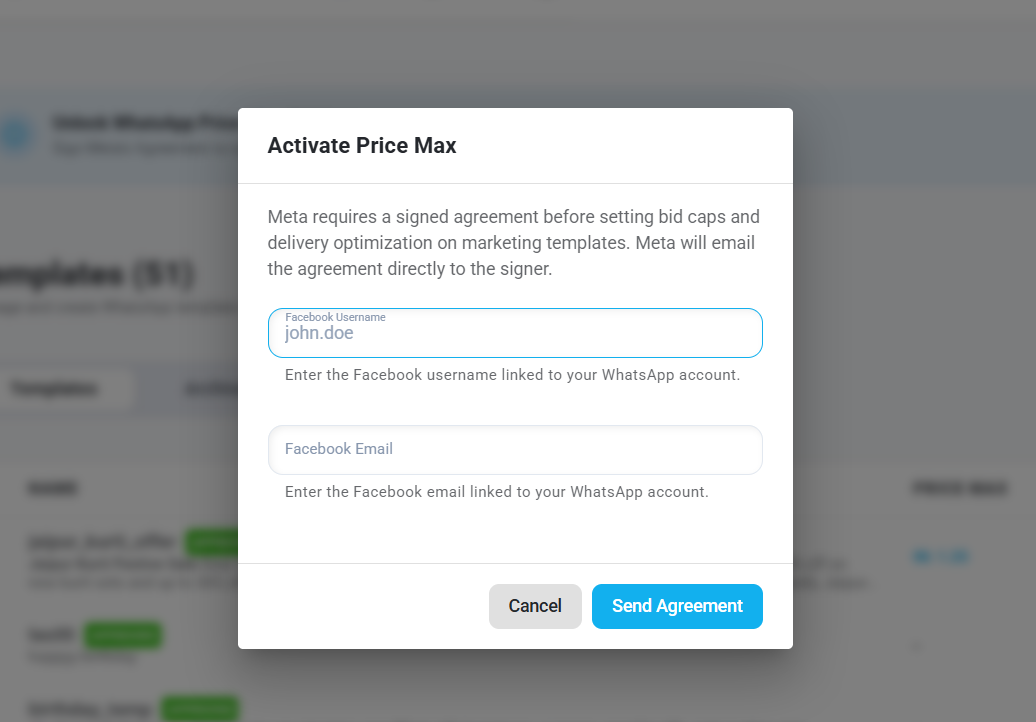
- In the Facebook username field, enter the username of the Facebook account linked to the WhatsApp account you use with EasySocial. Make sure you enter the correct account details.
- In the email field, enter the email address associated with that Facebook account. Check that the email address is correct, as the agreement will be sent to this address.
- Select Send Agreement.
- You will receive an email containing the agreement at the email address you entered. Open the email, review the agreement, and accept it by following the instructions provided.
- After the agreement is accepted and Price Max is unlocked, return to EasySocial.
If the agreement has not been accepted, Price Max may not be available for configuration.
Configure Price Max for a Marketing Template
- Go to Templates.
- Find the required WhatsApp marketing template and open its three-dot Actions menu.
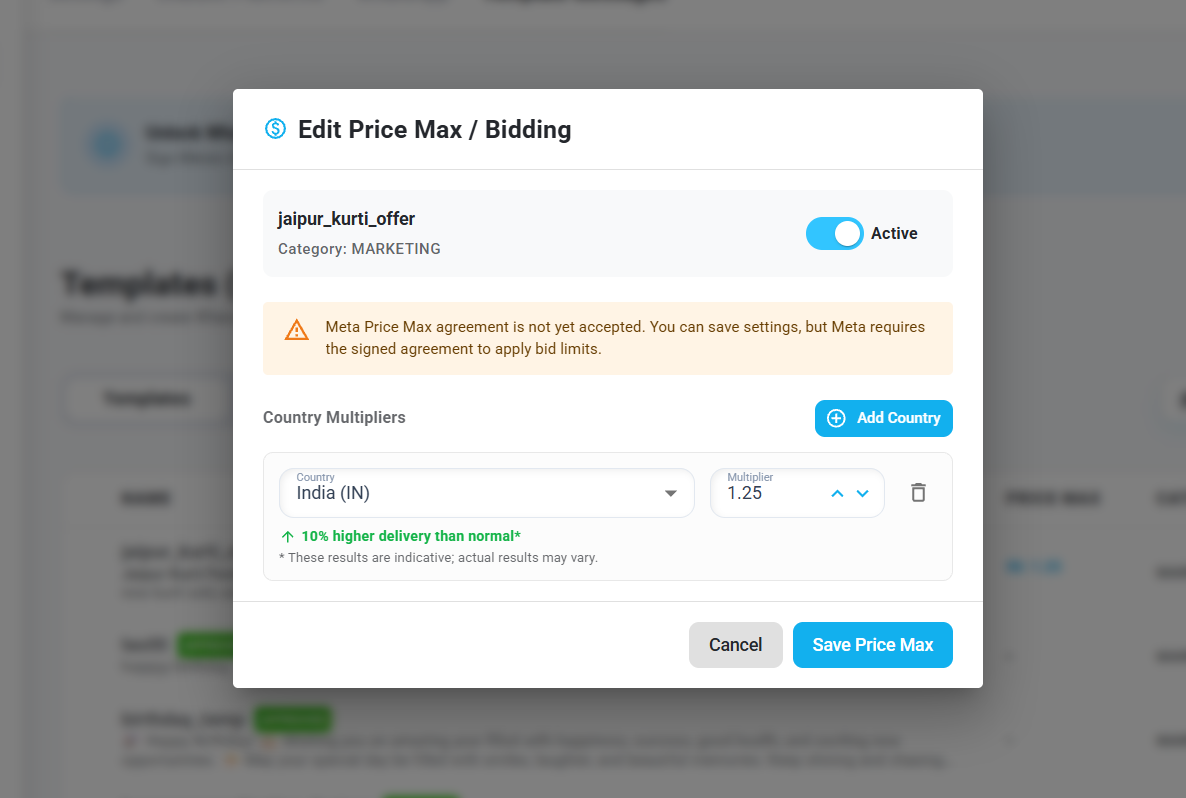
- Select Edit Price Max / Bidding.
- Switch Price Max to Active.
- Choose the country you want to configure. India is selected by default.
- Set the multiplier for that country.
- Review the indicative delivery estimate shown in the interface.
- Select Save Price Max.
How to interpret the multiplier
Each country has its own multiplier setting. The estimates below are examples shown in the demonstrated interface, not universal or guaranteed results.
| Example multiplier | Indicative estimate shown |
|---|---|
| 0.9 | About 10% lower delivery than normal |
| 1.1 | About 5% higher delivery than normal |
| 1.25 | About 10% higher delivery than normal |
Use the estimate as a reference when choosing a multiplier. Actual results can vary by campaign and recipient.
Set Price Max in a Broadcast Campaign
- Open the Campaigns or Broadcast page.
- Start a new broadcast campaign.
- Select the WhatsApp marketing template you want to send.
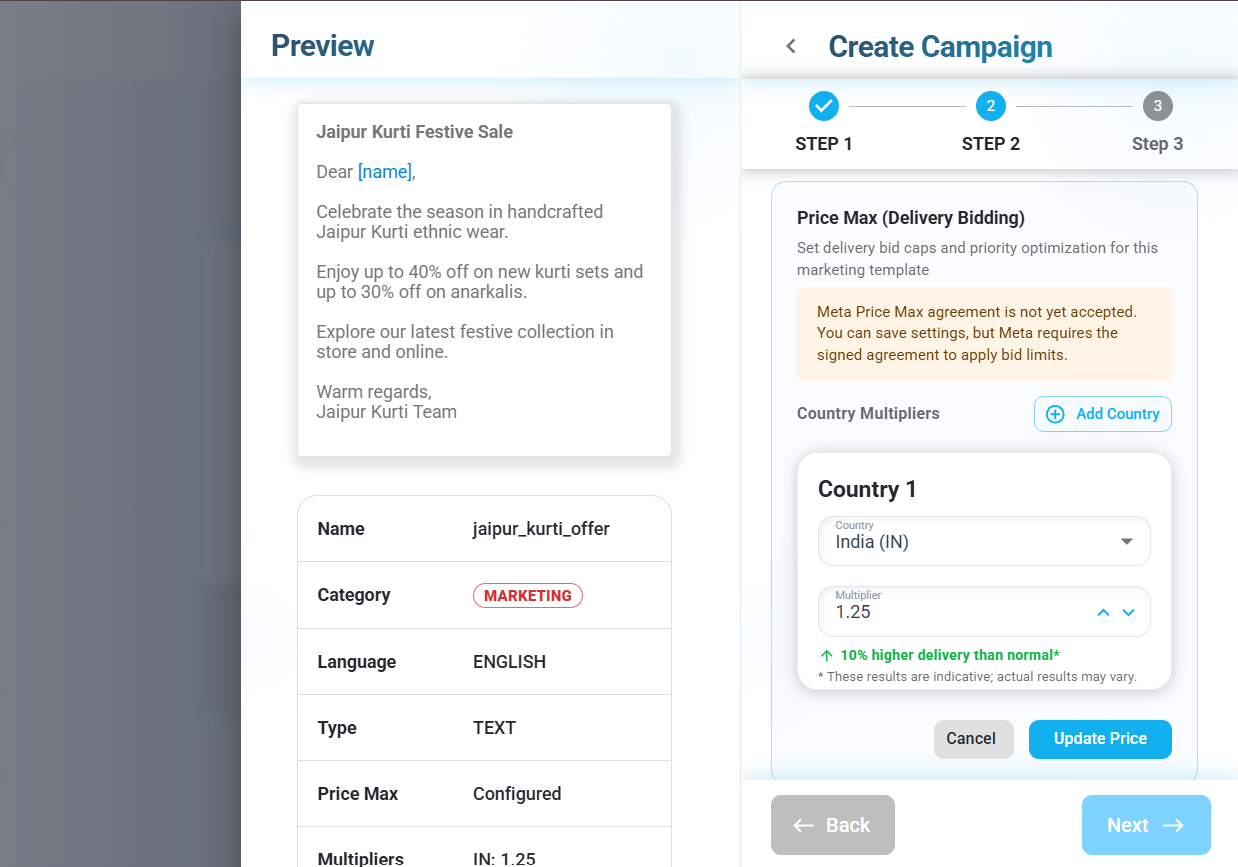
- Open the Price Max setting available in the campaign setup.
- Choose the relevant country and set the multiplier you want to use for this broadcast.
- Review the indicative delivery estimate and save the Price Max setting.
- Complete the remaining campaign setup, review your audience and message details, and launch the broadcast.
- After processing is complete, review the campaign analytics and delivery logs.
Tip: Choose a multiplier based on your campaign goals and the estimate shown in EasySocial. A higher multiplier may improve delivery chances, but it does not guarantee delivery.
Video tutorial: Watch the Price Max setup walkthrough.
Bonus Strategy: Try to Unlock Higher Message Delivery Rates
One strategy you can consider is to send the initial broadcast using a lower multiplier, review the results, and then retarget only the contacts whose messages were marked as failed using a higher multiplier. This gives selected contacts another delivery attempt without requiring you to resend the broadcast to everyone.
How to use this strategy
- Start with a lower multiplier: Set Price Max to a lower value for the initial broadcast, based on the options available in EasySocial.
- Launch and review: Send the broadcast and wait for processing to finish. Review the campaign analytics and open Logs → Failed to identify contacts whose messages were marked as failed.
- Retarget failed contacts: Return to the Campaigns list, open the three-dot menu beside the original campaign, and select Re-target.
- Select the original campaign: In Step 1, choose the original campaign and, under Select Status for Re-Targeting, select only Failed. Select Next.
- Use a higher multiplier: In Step 2, open Price Max and increase the multiplier for the relevant country—for example, you might move from 0.9 to 1.25 if those values are available for your campaign.
- Launch the retargeted campaign: Save the setting, complete the remaining setup, and launch the campaign.
- Compare results: Once processing finishes, review the new campaign's analytics and logs to assess the outcome.
Why consider this approach? It lets you start with a lower multiplier and apply a higher multiplier only to the selected failed contacts on a subsequent attempt, rather than automatically using the higher setting for the entire initial audience.
Important: A higher multiplier may improve delivery chances, but it cannot guarantee that failed messages will be delivered. Failures can occur for different reasons, and increasing the multiplier will not resolve every cause. Actual delivery and costs depend on the applicable bidding and billing rules, recipient eligibility, and Meta's systems.
Key Points to Remember
- Complete the required Meta agreement before using Price Max.
- Configure the multiplier for the relevant country.
- Review the on-screen estimate before saving your settings.
- Treat estimates as indicative, not guaranteed outcomes.
- A higher multiplier does not override Meta's delivery rules.
- Review campaign analytics and failed logs before deciding whether to retarget.
- Use the bonus strategy as an option to test, and compare actual campaign results before deciding whether to repeat it.