
Comments Automation
Comments Automation helps you manage comments on your social posts with AI. You can add response instructions and choose what should happen after a comment is handled—for example, alerting your team about a complaint or starting a WhatsApp conversation when someone asks to buy.
Enable Comments Automation
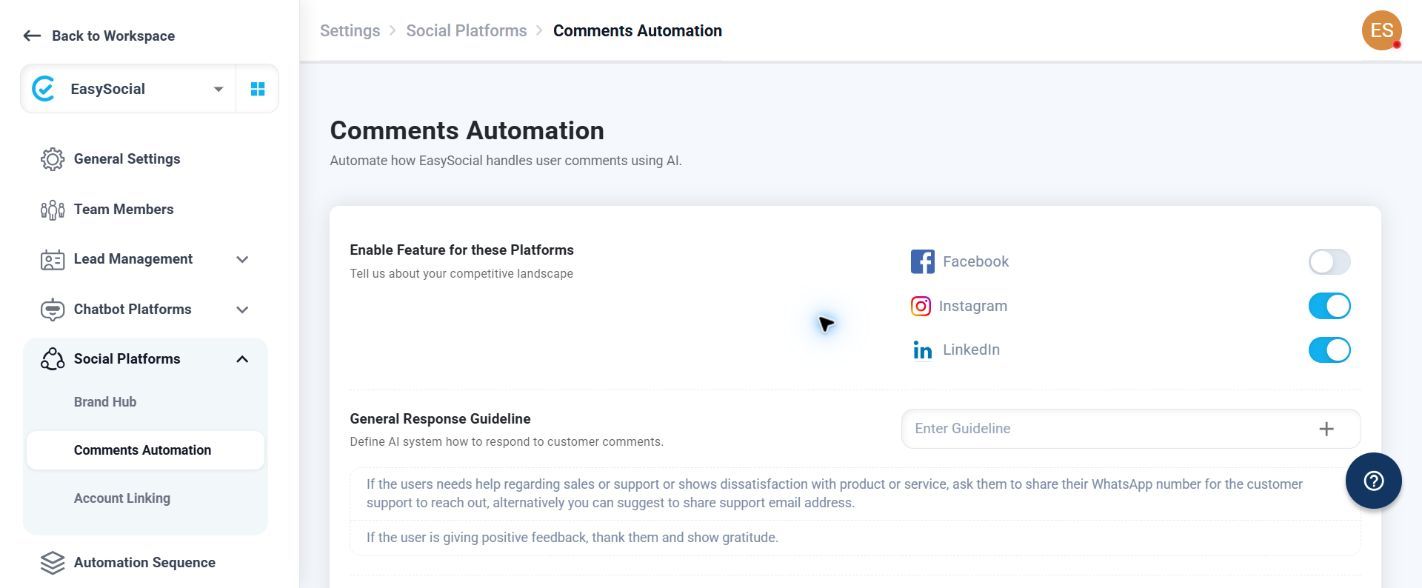
Select the platforms where you want comment automation to work. The available choices are Facebook, Instagram, and LinkedIn.
General Response Guideline
Use Enter Guideline to tell the AI how to respond to comments. Keep the instruction clear and practical—for example, “When a customer gives positive feedback, thank them and show gratitude for their support.” Each guideline you add appears below the input and can be removed individually.
Post Response Actions
Enable the actions that should run after the AI responds to a comment.
| Action | Available control | When to use it |
|---|---|---|
| Alert team members | Checkbox and Setup | Notify selected team members when a comment needs attention. Example: use it for comments such as “I am unhappy with this service.” |
| Initiate a WhatsApp conversation | Checkbox and Setup | Start a WhatsApp conversation when a customer shows purchase interest. Example: a comment such as “How can I place an order?” can move the conversation to WhatsApp. |
| Delete a comment containing customer contact number | Checkbox | Enable this when comments containing a customer contact number should be deleted. |
| Hide Spam Comments | Checkbox | Enable this when spam comments should be hidden automatically. |
If a response action or platform option does not work as expected, contact EasySocial Support.